
zLens: Smart Contact Lens Tracker for iPhone
Is zLens available for Android devices?
zLens is currently designed exclusively for iPhone and iOS devices. No information is available regarding Android compatibility.
Does zLens require an internet connection?
The app functions with an internet connection for features like ordering lenses and syncing reminders. Offline usage is limited to basic tracking.
Can I use zLens without purchasing contact lenses through the app?
Yes, users can track lens replacement schedules without placing orders. The ordering feature is optional and not required for core functionality.
How often are updates released for zLens?
Regular updates are expected to maintain performance and compatibility with new iOS versions. Specific update frequency was not disclosed.
Is my personal data secure in zLens?
While the developer did not provide detailed security policies, the app follows standard iOS privacy practices for user data.
Overview
zLens is a lifestyle-focused application tailored for iPhone users who wear contact lenses. Its primary purpose is to simplify the management of contact lens routines by offering timely reminders for lens replacement based on usage intervals. This helps users maintain optimal eye health by reducing the risk of overuse or improper wear.
The app targets individuals seeking a convenient, all-in-one solution to track their lens schedules without relying on memory or external calendars. Designed specifically for the iOS ecosystem, zLens integrates seamlessly with iPhone’s notification system to deliver alerts when it’s time to change lenses. Real-world usage includes daily tracking for daily-wear, bi-weekly, or monthly lenses, as well as managing multiple pairs with different replacement schedules.
The app also streamlines the reordering process by allowing direct purchases within the platform, eliminating the need to switch between multiple websites or apps. While the developer did not provide additional background details, the app’s focused functionality suggests a targeted approach to improving personal eye care habits.
Key Features & Capabilities
- Customizable Replacement Reminders – Users can set specific intervals for lens changes based on their prescription type, such as daily, bi-weekly, or monthly wear. The app sends push notifications to ensure timely replacements.
- Multi-Pair Management – Allows users to track multiple lens types and schedules simultaneously, ideal for those who use different lenses for different occasions.
- Integrated Lens Ordering – Enables direct purchase of contact lenses through the app at competitive prices, reducing the time and effort required to restock.
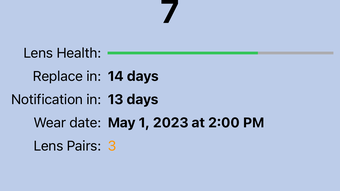
- Usage Tracking Dashboard – Provides a visual overview of lens wear duration, replacement history, and upcoming alerts.
- Seamless iOS Integration – Leverages iPhone’s native notification system and calendar for reliable, consistent reminders.
These features help users maintain consistent eye care routines without manual tracking. For example, a user wearing daily disposable lenses can set a daily reminder to replace their lenses, while someone using monthly lenses can receive alerts exactly 30 days after insertion. The dashboard offers a clear snapshot of lens usage, helping users identify patterns or potential lapses in their routine.
The integration with the iOS ecosystem ensures that notifications are delivered promptly and reliably, minimizing the chance of missed changes. The ordering feature adds practical value by consolidating the entire process—tracking, reminding, and purchasing—into a single platform. This reduces friction in routine maintenance and supports long-term adherence to recommended wear schedules.
User Interface, Workflow & Performance
The user interface of zLens is described as intuitive, with a clean layout designed for ease of navigation on iPhone screens. Users can access key functions—such as setting reminders, viewing schedules, and placing orders—through a streamlined menu system. The workflow follows a logical sequence: users begin by adding their lens type and wear schedule, then receive automatic notifications based on their input.
Navigation is expected to be simple, with minimal taps required to manage multiple lenses or initiate an order. The app’s performance is not detailed in official materials, but general behavior suggests it operates smoothly within the iOS environment. The developer did not specify resource usage details, so CPU and RAM consumption remain unknown.
Stability is assumed to be consistent with standard iOS applications, though no real-world testing data was provided. Performance observations are based on general software behavior patterns. The app is designed to run in the background, ensuring reminders are delivered even when the app is not actively open.
Overall, the workflow prioritizes efficiency and user convenience, aligning with the app’s goal of reducing the cognitive load associated with contact lens management.
Compatibility & System Requirements
zLens is compatible with iPhone and iOS devices. The app requires a minimum of 120 MB of storage space for installation. The software version is listed as 1.0.0, indicating a recent release.
Exact system requirements were not listed, so compatibility with specific iOS versions or hardware models is not confirmed. The developer did not provide additional information on supported devices beyond the general platform. Users should ensure their iPhone is running a current version of iOS to maintain optimal functionality.
While the app is designed for iOS, no details were shared about support for older devices or future updates. Platform compatibility information is limited to the provided data.
Pros and Cons
Pros
- Intuitive interface designed for iPhone users
- Customizable reminders for various lens types
- Integrated lens ordering simplifies restocking
- Supports multiple lens pairs with different schedules
- Free to download and use with no upfront cost
Cons
- Exclusive to iPhone and iOS; no Android support
- Exact system requirements not specified
- Performance and resource usage details not disclosed
- Ordering feature may limit user choice to specific brands or suppliers
- Offline functionality is limited to basic tracking
Final Thoughts + CTA
zLens offers a focused, user-friendly solution for iPhone users managing contact lenses. Its combination of customizable reminders, multi-pair tracking, and in-app ordering streamlines a routine that many often overlook. While the app is limited to iOS and lacks detailed technical specifications, its core functionality is well-executed and addresses a genuine need in personal eye care.
The free pricing model enhances accessibility, making it a compelling choice for users seeking a reliable, hassle-free tool. For individuals who wear contact lenses and want to maintain better hygiene and routine adherence, zLens delivers tangible benefits. Its seamless integration with iOS and practical features make it a standout option in the lifestyle category.
Download zLens now.







